How to Use Chromaterra: A Beginner's Guide to Recording Your Mood with Color
Published Updated
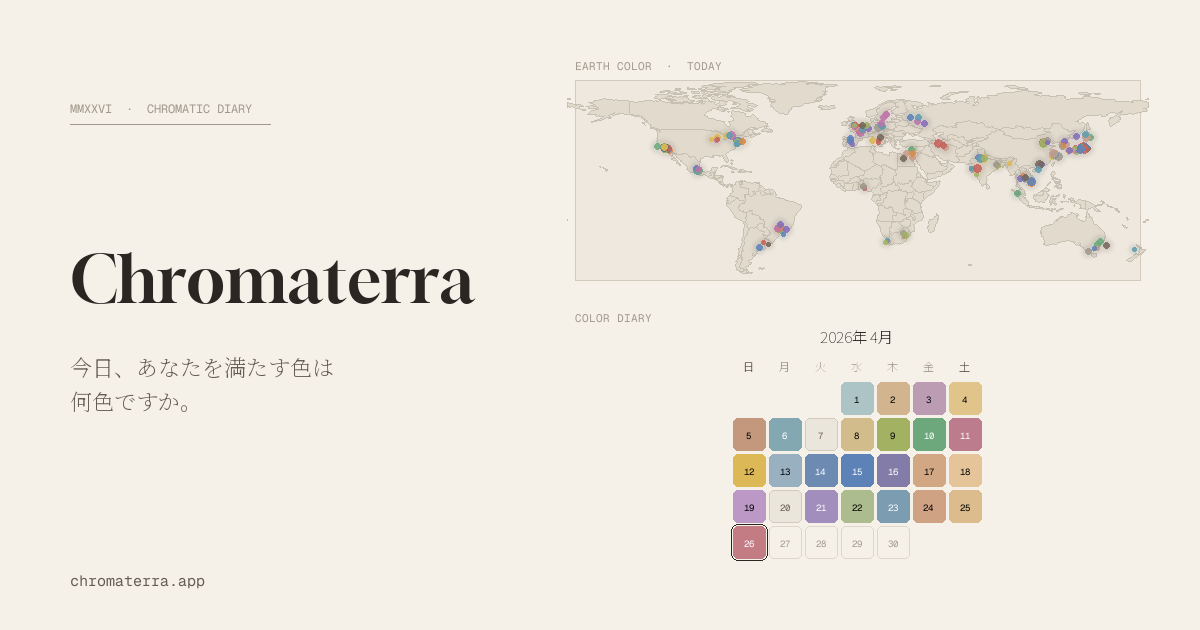
Chromaterra is a color diary service that lets you record your daily mood and experiences as a single color, then share them with users around the world. This guide introduces beginners to the four basic steps—from picking a color to exploring the world map. Unlike social media, there’s no need to craft sentences; you simply choose a color intuitively. It’s perfect for anyone who wants to sharpen their color sense or visualize how their mood shifts over time.
What Is Chromaterra? Start with the Basics
Chromaterra is the world’s first color diary platform that plots each user’s “color of the day” onto a global map.
- Record your mood with color: Express emotions through hues instead of words
- Share on a world map: See other users’ colors displayed as markers
- Privacy first: Notes and exact locations remain visible only to you
For example, you might condense the day’s mood into a single color: pale blue (■ #B8D8E8) for a calm morning, coral pink (■ #FF7F50) for an energetic day, or dusty rose (■ #C08081) for a sentimental sunset.
Four Steps to Record Your “Color of the Day”
Step 1: Pick a Color with the Color Picker
Tap the ”+ Today’s Color” button on the home page or in the header to open the color picker. Choose intuitively from the color wheel. If you’re unsure, try one of these mood-based palettes:
- Energetic days: Sun Yellow (■ #FFD93D) / Coral (■ #FF7F50) / Lime Green (■ #A8E063)
- Calm days: Sage Green (■ #9CAF88) / Beige (■ #E8DCC4) / Dusty Blue (■ #7A9CC6)
- Reflective days: Indigo (■ #3F4C8C) / Plum (■ #6B4965) / Charcoal (■ #3A3A3A)
Step 2: Add Keywords
Pair your chosen color with three to five keywords. Short phrases like “morning walk,” “coffee,” or “after the rain” work perfectly. The AI suggests candidates as you type, so when you’re stuck, just tap one of the displayed words.
Step 3: Set Your Location
Specify where on the map you’d like your entry plotted. To protect your privacy, only the city or municipality level is shown publicly—your precise coordinates remain visible only to you.
Step 4: Add a Note and Save
Write a short, free-form memo and tap “Save” to finish. Your notes stay private, so feel free to write honestly about whatever’s on your mind.
Reviewing Your Diary and Exploring the Color of Earth
Using the Diary Page
From the “Diary” link in the header, you can browse all your past entries.
- Calendar view: See a full month of colors as tiles at a glance
- Strata view: Each week becomes a single layer, stacked so you can watch the colors shift
- List view: Review entries in chronological detail
- Click a date to edit or delete that day’s record
Lining up a month of entries makes it easy to spot trends in your mood—whether blues are dominating or reds have started to rise.
Exploring the World Color Map
On the “World Color Map,” colors chosen by users around the globe appear as anonymous markers. Click a marker to see the keywords its author attached to that color.
- Time filter: Narrow by today, 7 days, or 30 days
- Color filter: Display only specific hues
- Regional panel: Check color trends by area
Guests (non-registered users) can only view the past 7 days. For full access to all time periods, we recommend creating a free account.
Settings and Data Management
The avatar icon in the header takes you to the settings page.
- Theme toggle: Dark / Light
- Language toggle: Japanese / English
- Data download: Export all your records as JSON
- Account management: Change password, delete account, and more
The data download feature is especially valuable—you can take your color records with you as a personal asset.
Creative Ways to Use Chromaterra
- As an emotion journal: Line up a month of colors to visualize the waves in your mood
- For design inspiration: Record colors from places you travel to build palettes
- Share moods with family and friends: Convey feelings that are hard to put into words
Summary
Chromaterra is a color diary anyone can start using right away in just four steps: pick a color → add keywords → set location → save. Since no writing is required, you can log an entry in 30 seconds even on the busiest days. Day by day, the colors you record become your own personal color autobiography.
Why not start with a free account (30 seconds) and place today’s mood color somewhere on the globe?